Archer Tower - Building Units in Clash of Clans
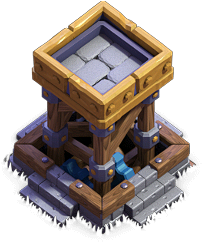
"No foe can escape the Archer's arrows. This tower has a special switch – choose long range or fast attack!"
| Level | Damage per second | Damage per shot | Hitpoints | Build cost | Build time | Experience gained | Builder hall level required |
|---|---|---|---|---|---|---|---|
| 1 | 40 | 40 | 500 | 12,000 | 5m | 17 | 2 |
| 2 | 44 | 44 | 575 | 30,000 | 15m | 30 | 3 |
| 3 | 48 | 48 | 660 | 60,000 | 2h | 84 | 3 |
| 4 | 53 | 53 | 760 | 250,000 | 8h | 169 | 4 |
| 5 | 59 | 59 | 875 | 800,000 | 1d | 293 | 5 |
| 6 | 64 | 64 | 1,050 | 1,200,000 | 2d | 415 | 6 |
| 7 | 71 | 71 | 1,250 | 2,000,000 | 4d | 587 | 7 |
| 8 | 78 | 78 | 1,450 | 2,800,000 | 6d | 720 | 8 |
| 9 | 86 | 86 | 1,650 | 3,600,000 | 8d | 831 | 9 |
| 10 | 94 | 94 | 1,850 | 4,600,000 | 9d | 881 | 10 |

Tapping this icon displays information about the Archer Tower, such as Level, Damage Per Second, Hitpoints, Range, Damage Type and Targets.

Tapping this icon begins upgrading the Archer Tower to the next level, if you have enough resources and a freeMaster BuilderorO.T.T.O. When the Archer Tower is at maximum level, this icon is not shown.

Tapping this icon instantly upgrades the Archer Tower to the next level, at the cost of oneHammer of Buildingif you have one. When the Archer Tower is at maximum level, or theBuilder Hallrequirements for the next level are not met, this icon is not shown.

Tapping this icon, which is displayed only while an upgrade is in progress, instantly finishes that upgrade at the cost of the displayed number ofGems.

Tapping this icon, which is displayed only while an upgrade is in progress, instantly finishes that upgrade at the cost of oneBook of Building. This icon is only shown if you have at least one Book of Building.

Tapping this icon, which is displayed only while an upgrade is in progress, instantly finishes that upgrade at the cost of oneBook of Everything. This icon is only shown if you have at least one Book of Everything but do not have a Book of Building.
Tapping this icon, which is displayed only while an upgrade is in progress, cancels the current upgrade and refunds half of the upgrade cost.

This icon indicates that the Archer Tower is set to Long Range mode, to attack units at a long range but with a reduced fire rate. Tapping this icon switches the Archer Tower to Fast Attack mode. This icon only appears when the Archer Tower is in Long Range mode.

This icon indicates that the Archer Tower is set to Fast Attack mode, to attack units quickly but with a reduced range. Tapping this icon switches the Archer Tower to Long Range mode. This icon only appears when the Archer Tower is in Fast Attack mode.
- The Archer Tower is a defensive building that can target both air and ground units. This building is unlocked at Builder Hall level 2. Like the Home Village Archer Tower , it is a single-target defense.
- The Builder Archer Tower can be set to Long Range or Fast Attack. Both modes have their advantages and disadvantages. The Long Range mode gives the Archer Tower a range of ten tiles, at the cost of DPS. It has the lowest DPS of any single-target defensive building at relative level in this mode. They can outrange Cannon Carts in their Mortar Mode. The Fast Attack mode gives the Archer Tower additional damage output by firing about twice as fast as the Long Range mode. This comes at the cost of range – even as its range is reduced by three tiles, it covers only about half of the area that a long-range Archer Tower would cover, and is vulnerable to being destroyed by Mortar Mode Cannon Carts.
- The Long Range mode gives the Archer Tower a range of ten tiles, at the cost of DPS. It has the lowest DPS of any single-target defensive building at relative level in this mode. They can outrange Cannon Carts in their Mortar Mode.
- The Fast Attack mode gives the Archer Tower additional damage output by firing about twice as fast as the Long Range mode. This comes at the cost of range – even as its range is reduced by three tiles, it covers only about half of the area that a long-range Archer Tower would cover, and is vulnerable to being destroyed by Mortar Mode Cannon Carts.
- The Master Builder can go to your Home Village and gear up an Archer Tower that is level 10 or above in order to allow it to toggle between Long Range and Fast Attack modes, which requires Town Hall 8. This requires a level 6 Archer Tower in the Builder Base, which is unlocked at Builder Hall 6. Like with other gear ups, only one Archer Tower can be geared up.
- Archer Towers can target both ground and air units at an amazing distance. Therefore, it is generally a good idea to place them on the outer perimeter of the base. Doing so allows players to capitalize on the excellent range and provides good coverage for the rest of the defenses .
- An Archer Tower set to Long Range can protect outer buildings from Sneaky Archers , Beta Minions , and Cannon Carts set to Mortar Mode. However, the Sneaky Archer 's Cloak ability allows it to hide for a few seconds, and the Archer Tower can do nothing to stop the Sneaky Archers under their cloak.
- An Archer Tower that is set to Fast Attack cannot protect buildings in front of it. However, it is more effective at taking down tank-units, and they are more able to handle small swarms of Bats or Skeletons in this manner.
- You can protect Archer Towers with splash damaging defenses like the Crusher since it is a single-target defense.
- It is typically a good idea to upgrade Archer Towers before you upgrade Cannons . Although they are more expensive and take longer to upgrade than similar-level Cannons, Archer Towers have more range and can target air units as well as ground units .
- It is typically wise to put an Archer Tower near a Cannon or the Multi Mortar due to the fact that neither of these two defenses can target air units.
- Placing Air Bombs and setting Mines and Mega Mines to air near an Archer Tower can help with its single-target weakness, especially against hordes of Beta Minions and Drop Ships .
- Archer Towers can target both ground and air units at an amazing distance. Therefore, it is generally a good idea to place them on the outer perimeter of the base. Doing so allows players to capitalize on the excellent range and provides good coverage for the rest of the defenses .
- An Archer Tower set to Long Range can protect outer buildings from Sneaky Archers , Beta Minions , and Cannon Carts set to Mortar Mode. However, the Sneaky Archer 's Cloak ability allows it to hide for a few seconds, and the Archer Tower can do nothing to stop the Sneaky Archers under their cloak.
- An Archer Tower that is set to Fast Attack cannot protect buildings in front of it. However, it is more effective at taking down tank-units, and they are more able to handle small swarms of Bats or Skeletons in this manner.
- You can protect Archer Towers with splash damaging defenses like the Crusher since it is a single-target defense.
- It is typically a good idea to upgrade Archer Towers before you upgrade Cannons . Although they are more expensive and take longer to upgrade than similar-level Cannons, Archer Towers have more range and can target air units as well as ground units .
- It is typically wise to put an Archer Tower near a Cannon or the Multi Mortar due to the fact that neither of these two defenses can target air units.
- Placing Air Bombs and setting Mines and Mega Mines to air near an Archer Tower can help with its single-target weakness, especially against hordes of Beta Minions and Drop Ships .
- Try to swarm the Archer Tower with swarm units such as Raged Barbarians as it only attacks one target at a time.
- Use tanks like Boxer Giants to distract it so that supported troops can take down outer buildings.
- Long-range Archer Towers have fairly low damage output. If you use Sneaky Archers or Beta Minions to snipe buildings and there are no more unprotected buildings, choosing buildings protected only by a single long-range Archer Tower will give your troops the most time to attack before they are destroyed.
- The best choices for attack are high health troops combined with low health, high attack troops, as the high health troops will soak up all the damage, leaving the low health ones to attack.
- When initially constructed, the Archer Tower is a basic wooden tower tied up with ropes, partially inside a square hole in the ground, with a lever next to it. At level 2, the Archer Tower's platform gains low wooden railing on all sides. The composition of the beams and ropes of the tower also change. At level 3, the tower uses thicker wood, most rope ties are gone. The hole in the ground is surrounded by stone and the lever gains more substantial housing. At level 4, the top platform's edges are reinforced with a riveted copper band. The beams and ropes are in new locations. At level 5, the rest of the ropes disappear and are replaced by riveted metal fittings and the copper band becomes gray metal. At level 6, the top platform's corners are reinforced with copper plates. The corners of the base gain additional stone bricks. At level 7, the top platform is now made of stone; its corner reinforcements are now livid metal, and its edges are completely metallic as well. Blue gears can be seen near the base of the tower. At level 8, the corners reinforcements are now golden, as are the bolts on it. A golden band replaces the metal on the perimeter of the tower as well. At level 9, the corners reinforcements become larger with two bolts on each side of the corner. The golden band becomes a bit thicker. The lever is removed from the side and replaced with stone stairs on all four sides. At level 10, the corners reinforcements become even larger, leaving only a small gap between them, the two bolts are more spaced out. The corners of the base are covered with riveted wood.
- At level 2, the Archer Tower's platform gains low wooden railing on all sides. The composition of the beams and ropes of the tower also change.
- At level 3, the tower uses thicker wood, most rope ties are gone. The hole in the ground is surrounded by stone and the lever gains more substantial housing.
- At level 4, the top platform's edges are reinforced with a riveted copper band. The beams and ropes are in new locations.
- At level 5, the rest of the ropes disappear and are replaced by riveted metal fittings and the copper band becomes gray metal.
- At level 6, the top platform's corners are reinforced with copper plates. The corners of the base gain additional stone bricks.
- At level 7, the top platform is now made of stone; its corner reinforcements are now livid metal, and its edges are completely metallic as well. Blue gears can be seen near the base of the tower.
- At level 8, the corners reinforcements are now golden, as are the bolts on it. A golden band replaces the metal on the perimeter of the tower as well.
- At level 9, the corners reinforcements become larger with two bolts on each side of the corner. The golden band becomes a bit thicker. The lever is removed from the side and replaced with stone stairs on all four sides.
- At level 10, the corners reinforcements become even larger, leaving only a small gap between them, the two bolts are more spaced out. The corners of the base are covered with riveted wood.
- When switching to Fast Attack Mode, the whole tower is lowered and only the top is visible.
- An unused ruined stats existed for Archer Tower, where one of the pillar is broken and the tower is leaning to the right side, the top platform is broken apart, and the lever is crooked to the side. An Archer stands on top of the wreckage.
- The Archers on top of the Archer Tower change their appearance as you upgrade the Archer Tower. The Archers that are on top of the tower appear to be Archers from the Home Village instead of Sneaky Archers . When initially constructed, the Archer Tower stations a single Archer that appears to be level 1 (or 2). When upgraded to level 4, the Archer atop the tower resembles a level 3 (or 4) Archer. When upgraded to level 6, the Archer atop the tower resembles a level 5 Archer. When upgraded to level 8, the Archer atop the tower resembles a level 6 Archer.
- When initially constructed, the Archer Tower stations a single Archer that appears to be level 1 (or 2).
- When upgraded to level 4, the Archer atop the tower resembles a level 3 (or 4) Archer.
- When upgraded to level 6, the Archer atop the tower resembles a level 5 Archer.
- When upgraded to level 8, the Archer atop the tower resembles a level 6 Archer.
- The number of Archers atop the tower is purely aesthetic. Archer Towers with two Archers at the top have the same range and rate of fire as towers with only one Archer at the top (although the individual Archers, which take turns to fire, will have different firing rates). This remains true if the Archer Tower is set to Fast Attack mode.
- The number of Archers atop the tower is purely aesthetic. Archer Towers with two Archers at the top have the same range and rate of fire as towers with only one Archer at the top (although the individual Archers, which take turns to fire, will have different firing rates). This remains true if the Archer Tower is set to Fast Attack mode.
- The number of Archers atop the tower is purely aesthetic. Archer Towers with two Archers at the top have the same range and rate of fire as towers with only one Archer at the top (although the individual Archers, which take turns to fire, will have different firing rates). This remains true if the Archer Tower is set to Fast Attack mode.
- The Archer Tower, along with the Walls , Army Camps , and X-Bow are the only Builder Base buildings that have the same name but have a different design than their Home Village versions. This is likely due to the fact that the tower itself has a system where it can be set into different modes and adding cohesion to the steampunk theme.
- This is likely due to the fact that the tower itself has a system where it can be set into different modes and adding cohesion to the steampunk theme.
- The Archer Tower and X-Bow are the only defensive buildings in Builder Base that have two modes.
- It is the only defensive building in the Builder Base that has troops on the top of it.