Gold Mine - Building Units in Clash of Clans
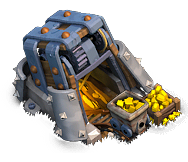
"The Gold Mine produces gold. Upgrade it to boost its production and gold storage capacity."
| Level | Capacity | Production rate | Hitpoints | Time to fill | Build cost | Build time | Experience gained | Catch up point | Builder hall level required |
|---|---|---|---|---|---|---|---|---|---|
| 1 | 24,000 | 1,000/hr | 300 | 1d | 1,000 | 10m | 24 | N/A | 1 |
| 2 | 28,800 | 1,200/hr | 350 | 1d | 5,000 | 20m | 34 | 1h 40m | 3 |
| 3 | 36,000 | 1,500/hr | 400 | 1d | 10,000 | 40m | 48 | 2h 40m | 3 |
| 4 | 43,200 | 1,800/hr | 460 | 1d | 30,000 | 2h | 84 | 10h | 4 |
| 5 | 50,400 | 2,100/hr | 550 | 1d | 60,000 | 6h | 146 | 1d 12h | 5 |
| 6 | 60,000 | 2,500/hr | 650 | 1d | 100,000 | 1d | 293 | 5d 6h | 6 |
| 7 | 72,000 | 3,000/hr | 750 | 1d | 200,000 | 1d 12h | 360 | 7d 12h | 7 |
| 8 | 84,000 | 3,500/hr | 850 | 1d | 300,000 | 2d | 415 | 12d | 8 |
| 9 | 96,000 | 4,000/hr | 1,000 | 1d | 400,000 | 2d 12h | 464 | 17d 12h | 9 |
| 10 | 108,000 | 4,500/hr | 1,150 | 1d | 800,000 | 3d | 509 | 24d | 10 |

Tapping this icon displays information about the Gold Mine, such as Level, Capacity, Production and Hitpoints.
Tapping this icon begins upgrading the Gold Mine to the next level, if you have enough resources and a freeMaster BuilderorO.T.T.O. When the Gold Mine is at maximum level, this icon is not shown.

Tapping this icon instantly upgrades the Gold Mine to the next level, at the cost of oneHammer of Buildingif you have one. When the Gold Mine is at maximum level, or theBuilder Hallrequirements for the next level are not met, this icon is not shown.

Tapping this icon, which is displayed only while an upgrade is in progress, instantly finishes that upgrade at the cost of the displayed number ofGems.

Tapping this icon, which is displayed only while an upgrade is in progress, instantly finishes that upgrade at the cost of oneBook of Building. This icon is only shown if you have at least one Book of Building.

Tapping this icon, which is displayed only while an upgrade is in progress, instantly finishes that upgrade at the cost of oneBook of Everything. This icon is only shown if you have at least one Book of Everything but do not have a Book of Building.
Tapping this icon, which is displayed only while an upgrade is in progress, cancels the current upgrade and refunds half of the upgrade cost.
- The Gold Mine collects Builder Gold from an unlimited underground reserve and stores it until collected by the player and placed into a Gold Storage . When the mine is full, production will be stopped until it is collected. It is unlocked at Builder Hall level 2.
- The production rate and storage capacity depends on the level of the Gold Mine. One can estimate the amount of resources in the mine by looking at the cart at the right side of the mine.
- The Gold Mine takes up a 3x3 space.
- When you choose to upgrade a Gold Mine, it will automatically collect any uncollected Builder Gold. Note that if your Gold Storage are full at that time, the uncollected Builder Gold will be lost! During the upgrade, the Mine stops producing Builder Gold.
- Unlike the Gold Mine in the Home Village, the Builder Gold produced by the Gold Mine in the Builder Base isn't at risk even if it is destroyed.
- At each level, the production per hour and its Builder Gold capacity are such that the Gold Mine always fills in 24 hours. This is much unlike the Home Village version, where lower leveled Gold Mines fill within a few hours but higher leveled Gold Mines take a few days to completely fill.
- The Gold Mine undergo significant visual changes at level 1, 2, 5, 7, 8, and 10.
- Before being repaired by the upgrade to Builder Hall level 2, it appears to be a collapsed wooden structure, a minecart being off-rail, and the light from the interior was very dim. At level 1, the Gold Mine consists of a somewhat dilapidated wooden structure partially covering a set of narrow rails diving deep within the earth. Periodically a rail cart full of Gold arrives and dumps its contents into a small repository to the side of the Mine, and then re-enters the Mine. At level 2, the Gold Mine appears to be fully repaired, and two wooden reinforcing bars appear on the outside of the wooden structure. There is also a very small stone rubble pile on the edge of the structure. At level 3, a third wooden reinforcing bar is added, and the rubble pile outside the structure grows to a noticeable size. At level 4, a fourth wooden reinforcing bar is added, and the rubble pile outside the structure grows larger as well. At level 5, the first major graphical change takes place. The wooden reinforcing bars are replaced with a blue-gray steel bar, and the rubble pile outside the Mine is replaced by a stone support. At level 6, a thin brown thread is added to the back of the Mine. At level 7, the steel reinforcing bar appears to be larger in width. Another wooden bar is also added to the back. At level 8, the Gold Mine now has two wide steel reinforcing bars bolted down, and a small pulley system, complete with a wooden track for the cable, appears on the top surface of the Mine. At level 9, additional pulley hardware is added to the top of the structure, and the pulley wheel itself grows larger. At level 10, the steel bars are made taller, covering the pulley system entirely, with two more steel bars added on top, perpendicular to the other two. A gear is added to the pulley system. The corners gain spiked metal armor, and the light shines even brighter.
- At level 1, the Gold Mine consists of a somewhat dilapidated wooden structure partially covering a set of narrow rails diving deep within the earth. Periodically a rail cart full of Gold arrives and dumps its contents into a small repository to the side of the Mine, and then re-enters the Mine.
- At level 2, the Gold Mine appears to be fully repaired, and two wooden reinforcing bars appear on the outside of the wooden structure. There is also a very small stone rubble pile on the edge of the structure.
- At level 3, a third wooden reinforcing bar is added, and the rubble pile outside the structure grows to a noticeable size.
- At level 4, a fourth wooden reinforcing bar is added, and the rubble pile outside the structure grows larger as well.
- At level 5, the first major graphical change takes place. The wooden reinforcing bars are replaced with a blue-gray steel bar, and the rubble pile outside the Mine is replaced by a stone support.
- At level 6, a thin brown thread is added to the back of the Mine.
- At level 7, the steel reinforcing bar appears to be larger in width. Another wooden bar is also added to the back.
- At level 8, the Gold Mine now has two wide steel reinforcing bars bolted down, and a small pulley system, complete with a wooden track for the cable, appears on the top surface of the Mine.
- At level 9, additional pulley hardware is added to the top of the structure, and the pulley wheel itself grows larger.
- At level 10, the steel bars are made taller, covering the pulley system entirely, with two more steel bars added on top, perpendicular to the other two. A gear is added to the pulley system. The corners gain spiked metal armor, and the light shines even brighter.
- Added the level 8 Gold Mine.
- Added the third Gold Mine available at Builder Hall level 8.
- Added the level 8 Gold Mine.
- Added the third Gold Mine available at Builder Hall level 8.
- Added the level 8 Gold Mine.
- Added the third Gold Mine available at Builder Hall level 8.
- At each level, the Builder Base's Gold Mine and Elixir Collector 's upgrade cost and time are equal.
- The Gold Mine is one of the buildings that you are automatically set with at the beginning of the tutorial to the Builder Base.
- Although directly selecting a Gold Mine with a Gold bubble above it automatically collects any resources it has stored, there is a way to check how much Builder Gold has been stored without collecting it. This can be done by moving any other building to an invalid spot on your map (e.g. off the edge of your map, or fully or partially occupied by an obstacle , decoration or another building) and releasing it while its surrounding square has turned red. Then select the desired Gold Mine and choose the "Info" option to display the amount of Builder Gold gathered by the Mine to that point.