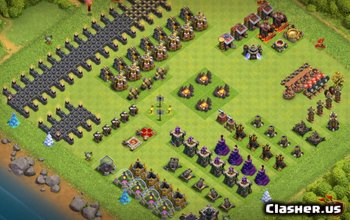
Wall - Unidades de construcción en Clash of Clans
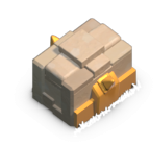
"Walls protect districts and keep enemies at bay. A district’s Walls are always the same level and upgrade at the same time. Build together, battle together, upgrade walls together!"
| Level | Hitpoints | Build cost | Cumulative build cost | Capital hall level required | District hall level required |
|---|---|---|---|---|---|
| 1 | 5,000 | 0 | 0 | 1 | 1 |
| 2 | 6,500 | 500 | 500 | 3 | 2 |
| 3 | 8,000 | 1,500 | 2,000 | 5 | 3 |
| 4 | 9,500 | 3,500 | 5,500 | 7 | 4 |
| 5 | 11,000 | 6,000 | 11,500 | 9 | 5 |

Tapping this icon displays information about the Wall, such as Hitpoints.

Tapping this icon contributes the Capital Gold you have into upgrading all Walls in the district to the next level. When the Walls in the district are at maximum level, this icon is not shown.
This icon indicates that the selected Wall piece is a Wall. Tapping it changes the Wall into a Gate, allowing defensive ground troops passage. This icon only appears in Village Edit Mode and if the conditions of changing the Wall into a Gate are met.
This icon indicates that the selected Wall piece is a Gate. Tapping it changes the Gate into a Wall, preventing defensive ground troops passage. This icon only appears in Village Edit Mode and if the conditions of changing the Wall into a Gate are met.
This icon indicates that the selected Wall piece is a Wall that cannot be changed into a Gate, because the conditions of changing it into a Gate are not met. This icon only appears in Village Edit Mode.

Tapping this icon marks the wall upgrade to the next level as a priority for the Clan, pinning it as a recommended upgrade for Clan members. This icon is only shown if the upgrade is possible, is not already prioritized and if the player is Leader or a Co-leader of their Clan.

Tapping this icon stops marking the wall upgrade to the next level as a priority for the Clan. This icon is only shown if the upgrade is possible, is being prioritized and if the player is Leader or a Co-leader of their Clan.
- Walls are structures that obstruct the path of enemy ground troops.
- Just like Walls in the Home Village and Builder Base , they can be bypassed by air troops as well as Hog Riders and Super Miners , and any ground troops being affected by the Jump Spell .
- Walls do not count towards destruction percentage when destroyed, and are not required to be destroyed to achieve 100% destruction.
- Unlike Walls in the Home Village or Builder Base, Walls in the Clan Capital will impede defending ground troops, which cannot jump over Walls. Instead, they are only able to move through Walls that have been turned into gates, which still block the movement of attacking troops. Defending ground troops, if impeded by Walls, will not attempt to break down Walls in order to reach attacking troops. They cannot use attackers' Jump Spells to get over Walls.
- Defending ground troops, if impeded by Walls, will not attempt to break down Walls in order to reach attacking troops. They cannot use attackers' Jump Spells to get over Walls.
- To turn a Wall into a gate, several conditions must be met: the Wall piece must be adjacent to exactly two other Wall pieces, neither of which are gates, such that these three Wall pieces form a line.
- When upgraded, all Walls in a district will be upgraded at the same time. This includes any Walls that are not yet rebuilt; they will be upgraded to the current Wall level once rebuilt. Such upgrades only count as a single upgrade towards the Capital Hall upgrade requirements, no matter how many Walls are upgraded.
- Walls shouldn't be your first priority as there is a fixed increase in hitpoints but an increase in cost. A level 3 wall should be sufficient to slow defenders.
- Walls can be used to close off areas to ground units, protecting defenses from melee units such as Super Barbarians . Ranged troops are able to attack over walls, so just like in the Home Village and Builder Base, it can be useful to guard front-line defenses with non-defensive buildings that cannot be easily picked off.
- Having gaps in walls can occasionally be a useful strategy to funnel ground units such as Super Giants into the gaps, even if the gap is a considerable distance away from the troops' deployment point.
- Do note, however, that ground troops can walk across diagonally adjacent open tiles without being impeded by walls, which is easy to overlook when using walls to block off either side of a bridge. In order to fully close off access of a bridge to ground units, the land tiles diagonally adjacent to the bridge must also be occupied by walls.
- Leaving gaps between a wall layer and the buildings behind it can prevent ground ranged troops from attacking it without first breaking the wall. A two-tile gap between the building and the wall is required to stop Sneaky Archers and Siege Carts from attacking the building directly, while a one-tile gap suffices against Super Wizards . However, in this latter case, one should note that Super Wizards may have their attacks chain onto the building if they attack the wall. Knowledge of these gaps can be used to redirect these ranged ground troops to some extent, since they will prefer to target buildings they can attack directly. This redirection can be used against them, by placing defenses to cover the areas they attack from.
- Knowledge of these gaps can be used to redirect these ranged ground troops to some extent, since they will prefer to target buildings they can attack directly. This redirection can be used against them, by placing defenses to cover the areas they attack from.
- Walls can be used to close off areas to ground units, protecting defenses from melee units such as Super Barbarians . Ranged troops are able to attack over walls, so just like in the Home Village and Builder Base, it can be useful to guard front-line defenses with non-defensive buildings that cannot be easily picked off.
- Having gaps in walls can occasionally be a useful strategy to funnel ground units such as Super Giants into the gaps, even if the gap is a considerable distance away from the troops' deployment point.
- Do note, however, that ground troops can walk across diagonally adjacent open tiles without being impeded by walls, which is easy to overlook when using walls to block off either side of a bridge. In order to fully close off access of a bridge to ground units, the land tiles diagonally adjacent to the bridge must also be occupied by walls.
- Leaving gaps between a wall layer and the buildings behind it can prevent ground ranged troops from attacking it without first breaking the wall. A two-tile gap between the building and the wall is required to stop Sneaky Archers and Siege Carts from attacking the building directly, while a one-tile gap suffices against Super Wizards . However, in this latter case, one should note that Super Wizards may have their attacks chain onto the building if they attack the wall. Knowledge of these gaps can be used to redirect these ranged ground troops to some extent, since they will prefer to target buildings they can attack directly. This redirection can be used against them, by placing defenses to cover the areas they attack from.
- Knowledge of these gaps can be used to redirect these ranged ground troops to some extent, since they will prefer to target buildings they can attack directly. This redirection can be used against them, by placing defenses to cover the areas they attack from.
- Battle Rams will destroy Walls of equal level (or lower) in a single hit. Even in air attacks, using Battle Rams can prove imperative to permanently break Walls, since they may block access to deployment zones, even after all the buildings they were guarding are destroyed. However, Battle Rams have AI similar to that of Wall Breakers in the Home Village, and will thus prioritize Walls that enclose buildings than those that do not. Jump Spells can provide forced temporary access past Walls that Battle Rams do not target.
- When initially rebuilt, the Walls resemble wooden stakes assembled together with stone bricks acting as a support at either side. As Wall corners, a series of planks is added across the Wall formation.
- As Wall corners, a series of planks is added across the Wall formation.
- At level 2, it resembles a series of worked lumber with accentuated metal spikes. The surrounding stone bricks are now worked as well. It gains a patterned sculpture at each sides of the wall.
- It gains a patterned sculpture at each sides of the wall.
- At level 3, it resembles an uncut rock with metal spikes. The corners of the wall are now replaced with stone.
- The corners of the wall are now replaced with stone.
- At level 4, it resembles a cut rock with metal reinforcements at either side. It gains a dark metal symbol at the center.
- It gains a dark metal symbol at the center.
- At level 5, it gains a stone hedge at the center and the metal reinforcements are now replaced with gold and added some golden spikes. The symbol is now replaced with gold metal.
- The symbol is now replaced with gold metal.
- Placing gates can cosmetically affect the appearance of the district by changing the layout of the paved pathways; said pathways can enter a enclosed wall compartment if one of the walls is turned into a gate.
- Placing gates can cosmetically affect the appearance of the district by changing the layout of the paved pathways; said pathways can enter a enclosed wall compartment if one of the walls is turned into a gate.
- Placing gates can cosmetically affect the appearance of the district by changing the layout of the paved pathways; said pathways can enter a enclosed wall compartment if one of the walls is turned into a gate.
- Placing gates can cosmetically affect the appearance of the district by changing the layout of the paved pathways; said pathways can enter a enclosed wall compartment if one of the walls is turned into a gate.