Gold Mine - Bygningsenheter i Clash of Clans
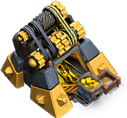
"The Gold Mine produces gold . Upgrade it to boost its production and gold storage capacity."
| Level | Capacity | Production rate | Hitpoints | Boost cost | Time to fill | Build cost | Build time | Experience gained | Catch up point | Town hall level required |
|---|---|---|---|---|---|---|---|---|---|---|
| 1 | 1,000 | 200/hr | 75 | N/A | 5h | 150 | 5s | 2 | N/A | 1 |
| 2 | 2,000 | 400/hr | 150 | N/A | 5h | 300 | 15s | 3 | 15s | 1 |
| 3 | 3,000 | 600/hr | 300 | N/A | 5h | 700 | 1m | 7 | 2m | 2 |
| 4 | 5,000 | 800/hr | 400 | N/A | 6h 15m | 1,400 | 2m | 10 | 6m | 2 |
| 5 | 10,000 | 1,000/hr | 500 | 4 | 10h | 3,000 | 5m | 17 | 20m | 3 |
| 6 | 20,000 | 1,300/hr | 550 | 5 | 15h 23m 5s | 7,000 | 15m | 30 | 50m | 3 |
| 7 | 30,000 | 1,600/hr | 600 | 6 | 18h 45m | 14,000 | 30m | 42 | 2h 10m | 4 |
| 8 | 50,000 | 1,900/hr | 660 | 7 | 1d 2h 18m 57s | 28,000 | 1h | 60 | 5h 20m | 4 |
| 9 | 75,000 | 2,200/hr | 720 | 8 | 1d 10h 5m 27s | 56,000 | 2h | 84 | 12h 40m | 5 |
| 10 | 100,000 | 2,800/hr | 780 | 9 | 1d 11h 42m 52s | 75,000 | 3h | 103 | 11h | 5 |
| 11 | 150,000 | 3,500/hr | 860 | 10 | 1d 18h 51m 26s | 85,000 | 4h | 120 | 16h | 7 |
| 12 | 200,000 | 4,200/hr | 960 | 10 | 1d 23h 37m 9s | 170,000 | 6h | 146 | 1d 6h | 8 |
| 13 | 250,000 | 4,900/hr | 1,080 | 11 | 2d 3h 1m 14s | 400,000 | 8h | 169 | 2d | 10 |
| 14 | 300,000 | 5,600/hr | 1,180 | 11 | 2d 5h 34m 18s | 800,000 | 10h | 189 | 2d 22h | 11 |
| 15 | 350,000 | 6,300/hr | 1,280 | 11 | 2d 7h 33m 20s | 1,200,000 | 18h | 254 | 6d | 12 |
| 16 | 385,000 | 7,000/hr | 1,350 | 11 | 2d 7h | 2,000,000 | 2d | 415 | 18d | 14 |
| 17 | 420,000 | 7,560/hr | 1,400 | 11 | 2d 7h 33m 20s | 8,000,000 | 4d | 587 | 50d | 16 |

Tapping this icon displays information about the Gold Mine, such as Level, Capacity, Production and Hitpoints.
Tapping this icon begins upgrading the Gold Mine to the next level, if you have enough resources and a freeBuilder(orB.O.B). When the Gold Mine is at maximum level, this icon is replaced by the Supercharge! icon.
Tapping this icon beginsSuperchargingthe maxed Gold Mine to the next charge, if you have enough resources and a freeBuilder(orB.O.B). When the Gold Mine is at maximum charge, this icon is not shown.

Tapping this icon instantly upgrades the Gold Mine to the next level, at the cost of oneHammer of Buildingif you have one. When the Gold Mine is at maximum level, or if theTown Hallrequirements for the next level are not met, this icon is not shown.

Tapping this icon, which is displayed only while an upgrade is in progress, instantly finishes that upgrade at the cost of the displayed number ofGems.

Tapping this icon, which is displayed only while an upgrade is in progress, instantly finishes that upgrade at the cost of oneBook of Building. This icon is only shown if you have at least one Book of Building.

Tapping this icon, which is displayed only while an upgrade is in progress, instantly finishes that upgrade at the cost of oneBook of Everything. This icon is only shown if you have at least one Book of Everything but do not have a Book of Building.

Tapping this icon, which is displayed only while an upgrade is in progress, gives the player the option to assign aBuilder's Apprenticeto that Building. This icon only is only shown if you have unlocked Builder's Apprentice for 500Gems.

Tapping this icon, which is displayed only while an upgrade is in progress, boosts all your Builders for 1 hour by a factor of ten, at the cost of oneBuilder Potion. This icon is only shown if you have at least one Builder Potion.
Tapping this icon, which is displayed only while an upgrade is in progress, cancels the current upgrade and refunds half of the upgrade cost.

Tapping this icon boosts yourGoldproduction for 1 day at the cost of the displayed amount ofGems.
Tapping this icon boosts your Gold production of all the Gold Mines for 1 day at the cost of the displayed amount of Gems.

Tapping this icon boosts the production of all the Resource collector buildings for 1 day at the cost of oneResource Potion. This icon is only shown if you have at least one Resource Potion.

Tapping this icon collects the uncollected Gold from the Gold Mine.

This icon informs you that you don't have Gold to be collected from your Gold Mine.
- The Gold Mine collects Gold from an unlimited underground reserve and stores it until collected by the player and placed into a Gold Storage . When the mine is full, production will be stopped until it is collected (or raided by an enemy player).
- The production rate and storage capacity depend on the level of the Gold Mine. One can estimate the amount of resources in the mine by looking at the small cart at the right side of the mine.
- The Gold Mine takes up a 3x3 space.
- When you choose to upgrade a Gold Mine, it will automatically collect any uncollected Gold. Note that if your Gold Storages are full at that time, the uncollected Gold will be lost. During the upgrade, the mine temporarily stops producing Gold.
- Tapping on a gold mine when the gold icon is up collects all gold from all the Gold Mines in your base.
- Once the Gold Mine has been upgraded to level 5, you can temporarily boost its production with Gems or a Resource Potion . Spending Gems will double the Mine's production for one day, while using a Resource Potion will double all Home Village resource collectors' production rate for one day. When you click to boost the Gold Mine, a clock appears for a few seconds. Level 1 to 4 Gold Mines cannot be boosted with Gems, but can still be boosted using a Resource Potion. However, you can only use the potion if you have a collector that can be boosted with Gems (either a level 5 or higher Gold Mine or Elixir Collector, or any level of Dark Elixir Drill ). If you upgrade the Gold Mine while a boost is active, the boost will end prematurely, even if the upgrade is later cancelled (or completes) at a time where the boost would have been active.
- Level 1 to 4 Gold Mines cannot be boosted with Gems, but can still be boosted using a Resource Potion. However, you can only use the potion if you have a collector that can be boosted with Gems (either a level 5 or higher Gold Mine or Elixir Collector, or any level of Dark Elixir Drill ).
- If you upgrade the Gold Mine while a boost is active, the boost will end prematurely, even if the upgrade is later cancelled (or completes) at a time where the boost would have been active.
- Pay careful attention to the location of Elixir Collectors when planning your attack, as Gold Mines are usually only marginally protected and can be quite lucrative, especially at high levels. Many times a single Archer can be placed in such a way that it can destroy a Gold Mine while standing clear of any defenses }, unless if it is stalled forever by a Battle Builder repairing the collector when it is in the healing range of a weaponized Builder's Hut. Alternatively, if you are at Town Hall 11 or higher, a single Sneaky Goblin can often destroy an Gold Mine without getting detected.
- If you see a round number of Gold in a raid , it is most likely going to be in the Gold Mines rather than in the Gold Storages (example 90,000). Although round numbers can occur in Gold Storages, they happen much more often when Gold Storages have been completely emptied by previous raids, and the resultant shield has allowed the Gold Mines to fill up completely.
- Make sure you target carefully, as Gold Mines tend to lure your troops away from what you intend to attack, ex. a Cannon or the Dark Elixir Storage .
- Pay careful attention to the location of Elixir Collectors when planning your attack, as Gold Mines are usually only marginally protected and can be quite lucrative, especially at high levels. Many times a single Archer can be placed in such a way that it can destroy a Gold Mine while standing clear of any defenses }, unless if it is stalled forever by a Battle Builder repairing the collector when it is in the healing range of a weaponized Builder's Hut. Alternatively, if you are at Town Hall 11 or higher, a single Sneaky Goblin can often destroy an Gold Mine without getting detected.
- If you see a round number of Gold in a raid , it is most likely going to be in the Gold Mines rather than in the Gold Storages (example 90,000). Although round numbers can occur in Gold Storages, they happen much more often when Gold Storages have been completely emptied by previous raids, and the resultant shield has allowed the Gold Mines to fill up completely.
- Make sure you target carefully, as Gold Mines tend to lure your troops away from what you intend to attack, ex. a Cannon or the Dark Elixir Storage .
- It is a good idea to put your Gold Mines outside of your Walls , so they can act as a distraction to units with no preferred target such as Barbarians and Archers .
- Attackers can steal up to 50% of the uncollected Gold in your mine. Having too many uncollected resources will make you a more attractive target.
- If a Gold Mine is destroyed in an attack while it is being upgraded, no Gold will be lost, as the mine is empty during this time.
- When you are farming for resources, it is a good idea to put all or some of your Gold Mines and Elixir Collectors in your Walls, so people can't steal uncollected resources as easily. It is better to place higher level collectors inside of Walls, as they will produce more Gold and are more valuable than the other Gold Mines. There is no need to protect them in your war base, as people cannot take your loot anyway.
- It is better to place higher level collectors inside of Walls, as they will produce more Gold and are more valuable than the other Gold Mines.
- There is no need to protect them in your war base, as people cannot take your loot anyway.
- When initially constructed, the Gold Mine consists of a somewhat dilapidated wooden structure covering a set of narrow rails diving deep within the earth, with the side having diagonal wood pieces, and the top having some crooked ones horizontally across, not covering the entrance of the mine properly. There is a tiny stone rubble pile on the edge of the structure. A very faint glow emits from the mine. A rail cart with blue wheels filled with gold periodically arrives and dumps its contents into a small wooden repository by tilting to the left, then it re-enters the mine. This process repeats until the Gold Mine is being upgraded or is full.
- At level 2, the Gold Mine appears to be fully repaired, with more wood pieces placed haphazardly over the top vertically, and held in place by two set of ropes reinforcing it. The rubble pile grows slightly. The light from the mine becomes more noticeable.
- At level 3, a third set of ropes is added and the wood pieces on top is arranged properly. The rubble pile grows to a noticeable size.
- At level 4, a fourth set of ropes is added. The rubble pile outside the mine grows even more. The light from the mine glows slightly brighter once again.
- At level 5, the wood pieces have been replaced with ones that have a uniform cut. The ropes are replaced with a blue-gray steel bar being riveted down with small bronze rivets. A stone foundation replaces the rubble pile in front of the mine, still having some jagged edges. The light emanating from the mine grows significantly more brighter and a steel reinforcement is added at the back.
- At level 6, another set of ropes is added to the back while the steel bar is moved up a bit.
- At level 7, the steel bar grows in width and the rivets are removed, and yet another set of ropes is added to the back. The foundation also increases in height in stages and is fully smooth now. The steel reinforcement in the mine grows taller and the wooden structure of the mine is replaced with metal.
- At level 8, another wide steel bar is added replacing the ropes, and both bars are riveted on the side. The furthest wood piece of the top is flipped up to make place and support a small pulley system on the top right part of the mine, complete with a track being held in place by the metal bars for the cable. The cable can be seen inside the mine. Two small stone protrusions appear on each side of the mine.
- At level 9, the back steel bar has a new rivet, an unused axle is added on the back bar across the whole top with a wood piece holding it up. The pulley wheel itself grows larger, the metal structure holding its axle gets wider placed and shifted the third wood piece on top in between it and the wheel. The two protrusions are taller and their base is reinforced.
- At level 10, the wood piece ceiling and steel bars are made taller, covering the pulley system entirely, with two more steel bars riveted on top, perpendicular to the other two. The pulley system now rest on the metal structure of the mine, a bigger gear is added to axle with the wheel and a smaller is placed on the unused axle of the back. The corners gain spiked metal plates, and the light shines even brighter. The protrusions are replaced with screws holding the reinforcement in place.
- At level 11, the steel bars on the top are replaced by a riveted steel panel with an opening, with a large gear is added to the top of the mine and its axle place across the plate. The gear itself has a section in the back with a track, pulling two cables; a second pulley wheel is added next to the original one, each pulling one cable. The spiked metal plates at each corner connect to each other with a few more spikes at the sides.
- At level 12, the rivets on the steel bar have moved up and get bigger as the mine is made slightly taller, metal plates have been added under the steel bar. The metal panel turns into a black metal, with handlebars added on each end of the axle. All gears turn golden, the top gear is flipped, consisting of a bigger and wider one at the back and a new gear that is smaller in the front, with two cables between them. The bottom gear gets bigger and wider as well, with an extra one in front which is smaller, and a three pulley wheel is added next to the two, also pulling its own cable. The corner plates no longer connect to the side and is made with black metal. The light becomes significantly brighter.
- At level 13, the rivets on the metal bars turn golden, and the one on top are removed but the handlebar gains a small amount of gold at the connection. The corner plates of the mine is replaced with a two-staged black metal plates, while the side plates become smaller and also made of black metal, all the spikes are removed.
- At level 14, the the front metal bar is replaced with black metal and the back becomes much darker, with most of the rivets removed besides one from the front bar. The top metal panel is removed and the top axle now host a long spiral gear with a small gold gear with a black rivet in front and black gear in the back. A track also exist in the front pulling a belt, while the back has two larger wheels with ropes, both connecting to the lower set of pulleys. The lower gears are replaced with one large, protruding gear in the middle, the belt track in front, and three pulley wheels in the back, with the final one leading into the mine. The corner plates are replaced with grey gradient stone.
- At level 15, the axles each has a new pulley in the front being connected with a belt, placed beyond the iron bar thus embedded it into the pulley system. The front gear of the top axle is completely gold, and the bottom one gain a slightly bigger golden gear with a black metal core and gold rivet. The corner plates are replaced with purplish-grey metal with a groove in the middle and gold reinforcement on the front of the mine and the side plate gain a shorter golden plate.
- At level 16, the main protruding gear is split into two, the front gear of the top axle has a black metal core and a smaller rivet, the bottom one is thicker, and a gold gear is added at the end of each axle. The belt is more grey and less shiny and the cable is made of hemp. The corner plates are now made of grey metal for the top half and gold at the bottom with two spikes each.
- At level 17, TBA.
- Level 5: 4h -> 2h
- Level 6: 12h -> 6h
- Level 7: 1d -> 12h
- Level 8: 2d -> 1d
- Level 9: 3d -> 2d
- Level 10: 4d -> 3d
- Level 11: 5d -> 4d
- Level 5: 4h -> 2h
- Level 6: 12h -> 6h
- Level 7: 1d -> 12h
- Level 8: 2d -> 1d
- Level 9: 3d -> 2d
- Level 10: 4d -> 3d
- Level 11: 5d -> 4d
- Level 5: 4h -> 2h
- Level 6: 12h -> 6h
- Level 7: 1d -> 12h
- Level 8: 2d -> 1d
- Level 9: 3d -> 2d
- Level 10: 4d -> 3d
- Level 11: 5d -> 4d
- Level 5: 4h -> 2h
- Level 6: 12h -> 6h
- Level 7: 1d -> 12h
- Level 8: 2d -> 1d
- Level 9: 3d -> 2d
- Level 10: 4d -> 3d
- Level 11: 5d -> 4d
- The upgrade costs of the Gold Mine and the Elixir Collector match at every level, but prior to the June 2021 update, there existed a discrepancy between the level 5 upgrade prices (3,000 Elixir for the Gold Mine, 3,500 Gold for the Elixir Collector), which was resolved by reducing the Elixir Collector's upgrade cost.
- Although directly selecting a Gold Mine with a Gold bubble above it automatically collects any resources it has stored, there is a way to check how much Gold has been stored without collecting it. This can be done by moving any other building to an invalid spot on your map (e.g., off the edge of your map, or fully or partially occupied by an obstacle, decoration or another building) and releasing it while its surrounding square has turned red. Then select the desired Gold Mine and choose the "Info" option to display the amount of Gold gathered by the mine to that point. Alternatively, you can also do this by going into Edit Mode and tap on a Gold Mine, and it will view how much Gold is stored inside, while also doing the same for the selected Mines.
- Alternatively, you can also do this by going into Edit Mode and tap on a Gold Mine, and it will view how much Gold is stored inside, while also doing the same for the selected Mines.
- The upgrade costs of the Gold Mine and the Elixir Collector match at every level, but prior to the June 2021 update, there existed a discrepancy between the level 5 upgrade prices (3,000 Elixir for the Gold Mine, 3,500 Gold for the Elixir Collector), which was resolved by reducing the Elixir Collector's upgrade cost.
- Although directly selecting a Gold Mine with a Gold bubble above it automatically collects any resources it has stored, there is a way to check how much Gold has been stored without collecting it. This can be done by moving any other building to an invalid spot on your map (e.g., off the edge of your map, or fully or partially occupied by an obstacle, decoration or another building) and releasing it while its surrounding square has turned red. Then select the desired Gold Mine and choose the "Info" option to display the amount of Gold gathered by the mine to that point. Alternatively, you can also do this by going into Edit Mode and tap on a Gold Mine, and it will view how much Gold is stored inside, while also doing the same for the selected Mines.
- Alternatively, you can also do this by going into Edit Mode and tap on a Gold Mine, and it will view how much Gold is stored inside, while also doing the same for the selected Mines.
- The Gold Mine is one of the 4 buildings that a player starts with at the beginning of the tutorial, the others being the Town Hall , Builder's Hut , and Army Camp .
- The Gold Mine's sound (when you collect gold from it) has the same sound with Fortune Tree, Golden Poet, and Golden Hog.
- The Gold Mine and the Elixir Collector are the cheapest Supercharge upgrades, in which case the Mine costs a total of 4.5 million Elixir.
- Categories :
- Buildings
- Resources
- Home Village